

You log in to run a simple report. Twenty minutes later, you are still waiting. Your team is stuck doing the same task in three different tools. Sound familiar?
If your ERP feels slow, clunky, or expensive to keep alive, you are not alone. Many businesses run on systems built years ago. They work, but barely. And every month you wait, the gap between you and faster competitors grows wider.
This is where an Odoo migration comes in. Moving from a legacy ERP to Odoo ERP can cut costs, speed up reporting, and connect your tools in one place.
1) Your ERP Vendor No Longer Offers Support
This is the most dangerous sign, and many businesses ignore it.
When your ERP vendor stops supporting your version, three things happen. First, you stop getting security updates. Second, bug fixes disappear. Third, there is no one to call when something breaks.
ERP vendors regularly end support for older product versions. Even Odoo itself sunsets older editions. Once your version hits end of life, you are running on borrowed time.
That was more expensive than a full Odoo migration would have been.
2) Maintenance Costs Are Eating Your IT Budget
Old ERPs are like old cars. The purchase price was years ago, but the repairs never stop.
Most businesses don't track all ERP costs in one place. They see the license fee. But they miss the consultant bills, the custom patch costs, the hardware upkeep, and the overtime hours from manual workarounds.
Here is where money leaks in a legacy ERP:
- Yearly license fees that rise every renewal
- Custom development for even small changes
- Expensive consultants who know the old system's code
- Sometime need dedicated servers that need cooling, power, and physical space
- Emergency fixes when something suddenly breaks
When you add it all up, the total often shocks people.
Odoo uses a modular, open approach. You pay for what you use. This often lowers your total ERP upgrade cost over time. 👉 Explore abour our Odoo ERP Migration Service
3) Your Reports Take Hours (or Days) to Generate
Good decisions need good data. Fast.
If your finance team needs two days to prepare a monthly report, something is very wrong. If your warehouse manager can't check stock levels without calling someone, that is a problem. If your CEO asks for a sales summary and the answer is "I'll get it to you by Friday," your ERP is failing.
Old systems often store data in separate places. Sales numbers sit in one module. Inventory counts live in another. Finance data hides in a third. Pulling them together takes manual work, spreadsheets, and a lot of copy-pasting.
This is not just slow. It is risky. Manual data handling leads to errors. Wrong numbers lead to wrong choices.
Odoo gives you live dashboards for sales, inventory, accounting, and more. The data updates in real time. You click, you see the numbers, you decide. No waiting.
Quick tip: Time how long your most common report takes. If it is more than a few minutes, that is a strong sign you need ERP modernization.
4) Your ERP System Can't Integrate With Modern Tools
Your business does not run on one tool anymore. You use email platforms, e-commerce stores, payment gateways, shipping apps, CRM tools, marketing software, and more.
A modern ERP should connect with all of them smoothly. Old systems often cannot. They were built in a time when businesses used far fewer digital tools.
When your ERP does not talk to your other apps, your team fills the gap. They export data from one screen, reformat it, and upload it to another. Every day.
Here is what broken integration looks like in practice:
- An online order comes in, but someone types it into the ERP by hand
- Shipping updates don't sync, so customers call asking "where is my order?"
- Invoice data lives in accounting software but not in the ERP
- Marketing can't see customer purchase history because the CRM is separate
Each gap means lost time, more errors, and frustrated customers.
Odoo solves this by offering 40+ built-in apps that already talk to each other. Sales, CRM, inventory, accounting, HR, project management, e-commerce, and more sit inside one system.
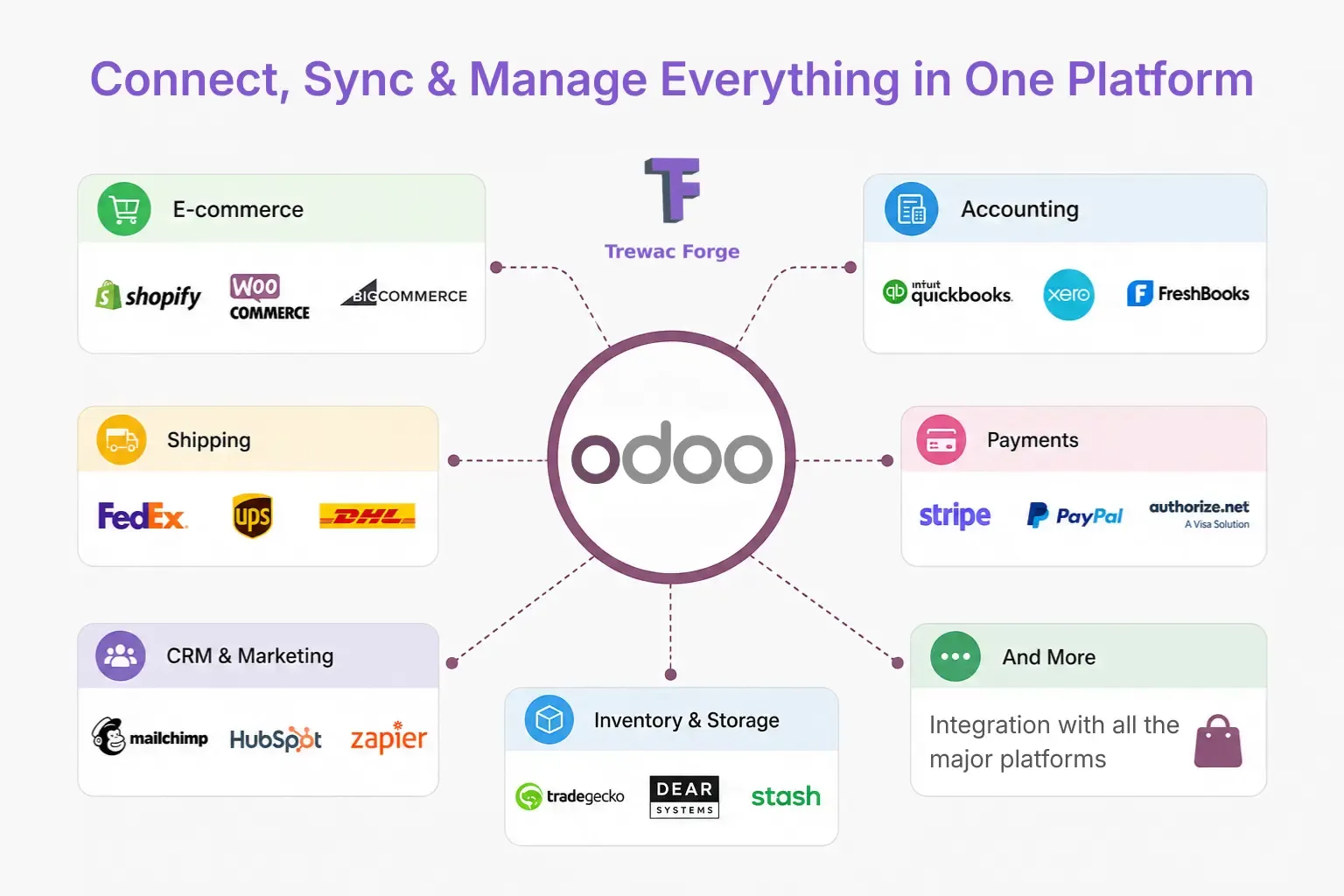
Trewac Forge does odoo integration mapping, which is one of the first things we do during any Odoo implementation for any business. We list every tool a business uses, check what connects natively, and build custom links where needed.
5) Users Hate It and Workarounds Are Everywhere
This sign hides in plain sight. Your team already knows the ERP is broken. They just stopped complaining about it.
Instead, they built workarounds. They keep personal spreadsheets. They track tasks in notebooks. They email data to each other instead of logging it in the system. They avoid certain screens because "it always crashes there."
These workarounds are dangerous. They create data silos, which means important information lives outside your ERP. If that person leaves the company, their knowledge goes with them.
Old ERPs often have confusing layouts, tiny fonts, and deep menu structures. New employees need weeks of training. Even experienced staff make mistakes because the system fights against them.
Signs your team has given up on your ERP:
- People use Excel for tasks the ERP should handle
- New hires take over a month to learn the basics
- Staff avoid entering data until the last minute
- Managers make decisions based on gut feeling, not system data
Our ERP has a clean, modern interface that looks and feels like the apps people already use on their phones. Most users learn the basics quickly. That means faster on-boarding, fewer errors, and happier employees.
👉 Explore also, ERP System for Manufacturing Business
6) Scaling Up Breaks Everything
Growth should be exciting. But when your ERP cannot handle growth, it becomes a source of stress.
Adding new users slows the system. Opening a new warehouse needs months of custom coding. Launching in a new country means currency and tax headaches that the ERP was never built to handle.
I have seen businesses delay expansion plans because their IT team said the ERP could not support it. That is not an IT problem. That is a business problem. Your software should follow your growth, not block it.
Common scaling problems with old ERPs:
- System slows down when more than 20 users log in at once
- Adding a new branch requires a separate installation
- Multi-currency or multi-language support is missing or buggy
- New product lines need expensive custom modules
Our Odoo ERP Implementation Service is built to scale from day one. You start with the modules you need. When you grow, you add more. Need multi-currency? Turn it on. New warehouse? Add it in minutes. A hundred new users? The cloud handles the load.
7) Your Competitor Already Moved On
This is the sign that stings the most. And it is the one most leaders only notice when it's almost too late.
Your competitor ships faster. Their customer service responds quicker. They launch new products while you are still setting up SKUs. They seem to run smoother with a smaller team.
Often, the reason is not a bigger budget or better people. It is better systems.
Modern ERP like Odoo gives a business speed. It removes bottlenecks. It lets small teams do the work of large ones. If your competitor migrated to a modern ERP and you are still patching an old one, the gap grows every quarter.
A legacy ERP to Odoo ERP migration puts you back on equal footing. It gives your team the same modern tools and speed that faster companies already use.
What Does Migrating to Odoo Actually Look Like?
The big fear we hear most is this: "Will migration be a nightmare?"
The honest answer: it depends on your setup. But a good plan makes it smooth. Here is a simple ERP migration checklist we follow at Trewac Forge.
Step 1: Review & Plan
We study your current system, data, and goals. This step decides everything else.
Step 2: Map Your Data
We sort what data moves over and what gets left behind. Clean data in means clean data out.
Step 3: Set Up Odoo
We build your Odoo modules to match how you actually work, not the other way around.
Step 4: Test Everything
We run the system with your team before going live. We fix issues early, not later.
Step 5: Go Live and Support
We launch, train your team, and stay close to help after the switch.
Will I lose any data during the Odoo data migration?
No, not with a proper plan. We back up everything before we start. We also test data after the move to confirm it all transferred correctly. 👉 Read in detail, Odoo Migration Service.
As an official Odoo partner, Trewac Forge handles each step for you. We have done these migrations many times, so you avoid the common traps.
Final Thoughts: Don't Wait for a Breakdown
Let's keep the main points simple.
First, watch for the clear signs: no support, high costs, slow reports, and frustrated users. Second, an Odoo migration can fix these problems with lower costs and faster tools. Third, a careful plan keeps your data safe and your team confident.
The worst time to switch is after a system crash. The best time is now, while you can plan calmly.
If your old ERP is slowing you down, let's talk. Trewac Forge is an official Odoo partner, and we guide businesses through every step of their move to Odoo. Book a free migration review today and see how easy your switch can be.
Your competitors are not waiting. You don't have to either.
FAQs
Free 30-min session
Ready to explore Odoo for your business?
Talk to a certified Odoo partner. No sales pitch — just a straight conversation about whether Odoo is the right fit.